Definition
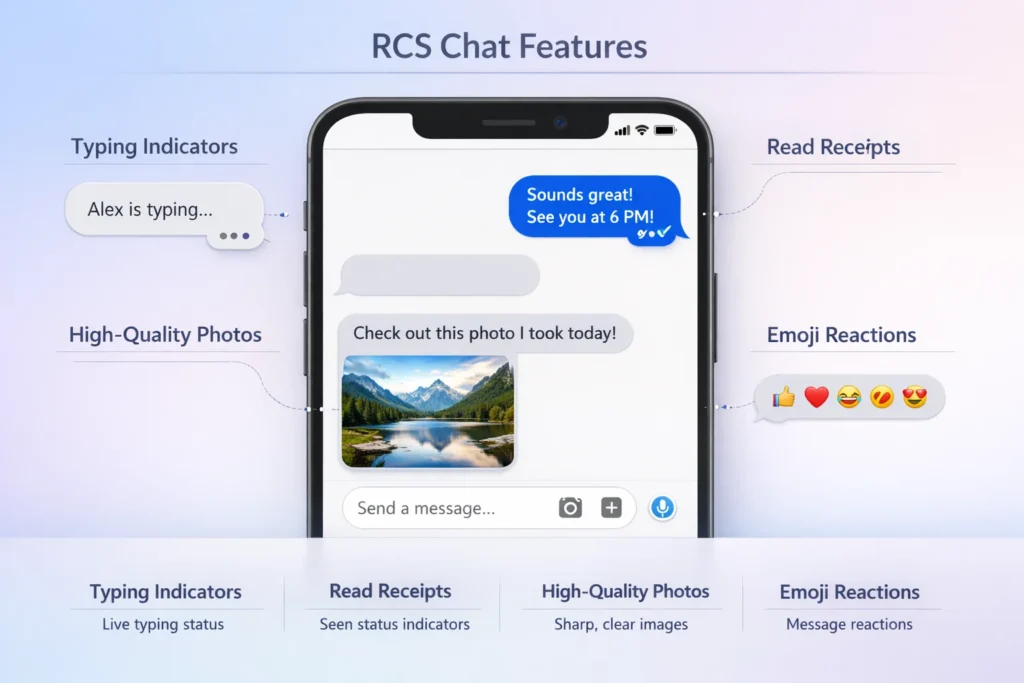
RCS in text messaging stands for “Rich Communication Services.” It is a modern messaging protocol that upgrades traditional SMS (Short Message Service) with advanced features like read receipts, typing indicators, high-quality media sharing, group chats, and internet-based messaging.
If you’ve ever noticed typing indicators, read receipts, or the ability to send high-quality photos in your messaging app, you might have already used RCS without even realizing it.
In today’s fast-paced digital world, standard SMS feels outdated. People want messaging that feels more like chat apps such as WhatsApp or Messenger. That’s exactly where RCS messaging comes in it bridges the gap between basic texting and modern messaging apps.
So, what does RCS mean in text conversations, and why is it becoming so important? Let’s break it down in simple, practical terms.
What Is RCS in Text Messaging?
RCS (Rich Communication Services) is the next generation of SMS. It enhances your regular texting experience by adding features typically found in internet-based messaging apps.
Key Features of RCS:
- ✔️ Read receipts (you can see when someone reads your message)
- ✔️ Typing indicators (see when someone is typing…)
- ✔️ High-quality image and video sharing
- ✔️ Group chats with better controls
- ✔️ Wi-Fi or mobile data messaging
- ✔️ Reactions (like 👍❤️😂)
👉 In simple terms:
RCS turns your basic text messages into a smart, interactive chat experience.
Origin of RCS: Where Did It Come From?
RCS was developed as a collaborative effort by the mobile telecommunications industry to replace SMS and MMS.
Timeline Overview:
- Early 2000s: SMS and MMS dominate communication
- 2008: RCS concept introduced by the GSM Association (GSMA)
- 2016+: Major push by companies like Google to adopt RCS globally
- Present: RCS is widely available on Android devices and expanding
Why Was RCS Created?
Traditional SMS had limitations:
- Character limits
- No read receipts
- Poor media quality
- No internet-based features
RCS solves these issues by using mobile data or Wi-Fi instead of relying only on cellular networks.
Why Is RCS Becoming Popular?
RCS is growing fast because it offers a better user experience without needing third-party apps.
Reasons for Popularity:
- 📱 Built directly into messaging apps (like Google Messages)
- 🌐 Works over internet (Wi-Fi or mobile data)
- 💬 Feels like WhatsApp or iMessage
- 🧑🤝🧑 Improved group chat experience
- 📸 Better media sharing
Real-World Impact:
- Businesses use RCS for interactive customer support
- Users enjoy smoother, richer conversations
- It reduces reliance on multiple messaging apps
How RCS Is Used in Real Conversations
Unlike slang abbreviations, RCS is not something you type in a message it’s a technology working behind the scenes.
However, people may refer to it in conversations like this:
Example Usage:
- “Are you using RCS? I can see when you read my messages.”
- “Switch to RCS chat it’s way better than SMS.”
- “My messages aren’t sending as RCS, only SMS.”
Examples of RCS Features in Action
Here’s how RCS changes everyday texting:
| Scenario | SMS Experience | RCS Experience |
|---|---|---|
| Sending a photo | Blurry, compressed image | High-quality image 📸 |
| Group chat | Limited, messy replies | Organized group chat 💬 |
| Message delivery | No confirmation | Delivered & read receipts ✔️✔️ |
| Typing | No indicator | “Typing…” shown ✍️ |
| Reactions | Not supported | Like, love, laugh reactions ❤️😂 |
Tone and Communication Style with RCS
While RCS itself doesn’t change tone, its features influence how messages feel.
Friendly Tone 😊
- “Hey! Did you see my message?”
- (You can confirm via read receipt)
Neutral Tone 😐
- “Please review the file I sent.”
- (Clear delivery confirmation)
Slightly Pressuring Tone 😬
- “I saw you read it… any updates?”
- (Read receipts can create subtle pressure)
👉 Tip: Be mindful features like read receipts can affect how your message is perceived.
RCS vs SMS vs MMS: What’s the Difference?
| Feature | SMS | MMS | RCS |
|---|---|---|---|
| Internet required | ❌ | ❌ | ✔️ |
| Media quality | Low | Medium | High |
| Read receipts | ❌ | ❌ | ✔️ |
| Typing indicators | ❌ | ❌ | ✔️ |
| Group chat | Basic | Limited | Advanced |
| Character limit | 160 | Higher | Practically unlimited |
👉 Bottom Line:
RCS is the most advanced and user-friendly messaging option.
RCS vs Popular Messaging Apps
| Feature | RCS | iMessage | |
|---|---|---|---|
| Built-in texting | ✔️ | ❌ | ✔️ (Apple only) |
| Works on Android | ✔️ | ✔️ | ❌ |
| Internet required | ✔️ | ✔️ | ✔️ |
| End-to-end encryption | ✔️ (in many cases) | ✔️ | ✔️ |
👉 RCS aims to combine the best of SMS and chat apps.
Alternate Meanings of RCS
While “Rich Communication Services” is the most common meaning in texting, RCS can also stand for:
- Radar Cross Section (in physics/engineering)
- Remote Control System
- Revision Control System (in software development)
- Royal Corps of Signals (military context)
👉 Always consider context to understand the correct meaning.
When Should You Use or Enable RCS?
You don’t “use” RCS like slang you enable it.
How to Use RCS:
- Open your messaging app (e.g., Google Messages)
- Go to Settings
- Enable “Chat features” or “RCS chats”
When It’s Useful:
- Sending high-quality photos/videos
- Group conversations
- Business messaging
- Everyday chatting
Polite or Professional Alternatives to RCS Features
Sometimes, relying on features like read receipts can feel intrusive. Here are alternatives:
| Situation | Better Approach |
|---|---|
| Waiting for reply | “Just checking in when you’re free.” |
| Confirming message | “Let me know if you received this.” |
| Urgent follow-up | “Please reply when possible—this is time-sensitive.” |
👉 Clear communication always beats relying on features alone.
Common Issues with RCS
Even though RCS is powerful, it’s not perfect.
Potential Problems:
- ❌ Not supported on all devices (especially older phones)
- ❌ Requires internet connection
- ❌ Compatibility issues between Android and iPhone
- ❌ Sometimes falls back to SMS automatically
FAQs:
1. What does RCS stand for in texting?
RCS stands for Rich Communication Services, a modern upgrade to SMS messaging.
2. Is RCS better than SMS?
Yes, RCS offers advanced features like read receipts, typing indicators, and high-quality media sharing.
3. Does RCS cost money?
RCS uses internet data (Wi-Fi or mobile data), so it doesn’t charge per message like SMS.
4. Can iPhone users use RCS?
Traditionally no, but support is gradually expanding depending on updates and regions.
5. Why are my messages not sending as RCS?
Possible reasons include:
- No internet connection
- RCS not enabled
- Recipient doesn’t support RCS
6. Is RCS safe?
Yes, many RCS chats support encryption, but security may vary by device and app.
7. Do I need an app for RCS?
Usually no—many phones have built-in support in default messaging apps.
8. Can I turn off RCS?
Yes, you can disable it in your messaging settings and revert to SMS.
Conclusion:
RCS is transforming the way we text by turning simple SMS into a rich, interactive messaging experience. It’s faster, smarter, and far more engaging than traditional texting.
RCS (Rich Communication Services) is a major upgrade to traditional SMS, bringing modern features like read receipts, typing indicators, high-quality media sharing, and smoother group chats. Instead of sending basic text messages, RCS makes conversations feel more like today’s popular messaging apps.
In simple terms, it replaces old-school texting with a smarter, more interactive experience using internet connectivity.
Discover More Related Articles:
- B Width Mean in Shoes: Fit, Sizing, and Comfort Tips for 2026
- Repentance Mean in the Bible: Powerful Truth Most People Miss In 2026

Jessica Brown is a language-focused writer who creates well-researched articles on word meanings, abbreviations, and everyday expressions. She contributes to meanvoro.com, delivering simple, reliable, and reader-friendly content designed to make complex terms easy to understand.